How Field Agents Can Use an Android Locking App to Improve EMI Recovery Rates
- What an Android Locking App Actually Does in a Lending Context
- Where Field Agents Fit Into the Device-Lock Workflow
- How to Set Up the Lock Protocol Before Disbursement
- Running the Lock-Unlock Cycle Without Friction
- Common Mistakes That Reduce Recovery Rates
- How Freebird Supports the Field Agent Device-Lock Workflow
- Building a Field Agent Training Process Around Device Locking
- Measuring Whether the System Is Working
- The Bigger Picture for Small Lenders
- Frequently Asked Questions
Field agents spend a significant chunk of their week chasing borrowers who've already received SMS reminders, WhatsApp messages, and phone calls — and still haven't paid. When your team is managing 200 or 300 active loans across multiple branches, that follow-up cost adds up fast. An Android locking app changes that dynamic by giving field agents a real enforcement tool they can use without leaving the office, without confrontation, and without writing off the EMI as a loss.
Here's exactly how device locking fits into a collections workflow, where field agents fit into that process, and what your team needs to do differently to see real results.
What an Android Locking App Actually Does in a Lending Context
When a borrower finances an Android device through your operation — smartphone, tablet, consumer durable — you retain leverage over that device until the loan is repaid. An Android locking app lets you exercise that leverage remotely.
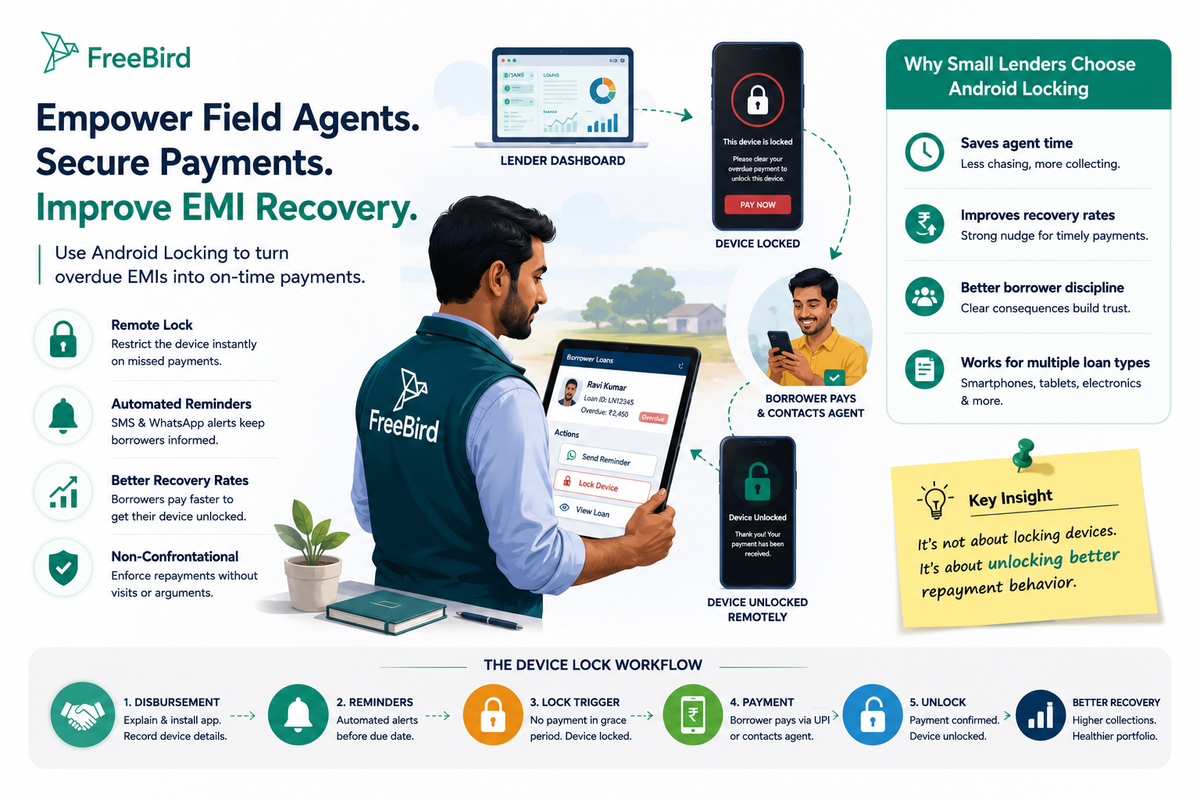
The mechanism is straightforward. The borrower installs a lightweight app at the point of disbursement. If an EMI goes unpaid past the due date, you trigger a lock from the management dashboard. The device becomes restricted — typically showing a payment prompt screen — until the borrower clears the overdue amount. Once payment is confirmed, the lock releases remotely and the device returns to full functionality.
This isn't a punitive measure in isolation. It's a structured reminder with teeth. Most borrowers respond before the lock is even triggered, because they know the mechanism exists.
Where Field Agents Fit Into the Device-Lock Workflow
Field agents aren't replaced by device locking. They become more effective because of it.
Without device locking, your agent's only tools are physical visits and phone calls. Both require the borrower to be available, cooperative, and willing to pay on the spot. That's a lot of variables outside your agent's control.
With an Android locking app in place, the workflow shifts:
- Pre-lock stage: Automated SMS and WhatsApp reminders go out before the due date. No agent time required.
- Lock trigger: If payment isn't received within the grace period, the manager or agent triggers the lock from the dashboard.
- Borrower response: The borrower contacts the agent or pays directly through a digital channel — UPI, for example — to get the device unlocked.
- Unlock confirmation: The agent confirms payment in the system and releases the lock remotely.
The field agent's role moves from chasing to confirming. That's a meaningful shift in how your team spends its time.
How to Set Up the Lock Protocol Before Disbursement
The device-lock workflow only works if it's established at disbursement — not after the first default. Field agents are the ones sitting across from the borrower at that moment, which makes their role in setup critical.
Explain the Mechanism Clearly at Disbursement
Walk the borrower through how the lock works before they sign anything. Not as a threat — as a transparency measure. Borrowers who understand the mechanism upfront are far less likely to feel blindsided if a lock triggers later, and they take payment deadlines more seriously from day one.
A simple script works: "This device is financed through us. If a payment is missed past the grace period, the device will be restricted until the payment is cleared. Once you pay, it's unlocked immediately."
That conversation takes two minutes. It sets the tone for the entire repayment relationship.
Confirm App Installation Before the Borrower Leaves
The field agent should verify the locking app is installed and functioning before the borrower walks out. This sounds obvious, but it's the step most commonly skipped when agents are processing multiple disbursements in a day.
A checklist in the field agent app helps here. Freebird's Android field agent app supports on-ground disbursement workflows, so agents can log the device, confirm installation, and record the borrower's acknowledgment in one place.
Record Device Details in the Loan Record
Capture the device model, IMEI, and the borrower's linked phone number at disbursement. This needs to sit inside the loan record — not a separate spreadsheet. If it's in the loan record, any team member can trigger or release a lock without hunting for details.
Running the Lock-Unlock Cycle Without Friction
The goal isn't to lock devices as often as possible. It's to use the threat of locking to maintain consistent repayment behavior, and to resolve locks quickly when they do happen.
Set a Clear Grace Period Policy
Decide in advance: how many days after the due date does a lock trigger? Three days? Five? The answer depends on your borrower base and your risk appetite. What matters is that the policy is consistent and every field agent knows it.
Inconsistency is where collections workflows break down. If some agents trigger locks after three days and others wait two weeks, borrowers learn they can negotiate the timeline. That's the opposite of what you want.
Use Automated Reminders Before the Lock
Field agents shouldn't be the first point of contact for overdue EMIs. Automated WhatsApp and SMS reminders should go out at the due date, then again at day two or three. The lock triggers only if those reminders produce no response.
This sequencing protects your agents from being the "bad guy" in every interaction. The automated system handles the first round of follow-up. The agent steps in only after the borrower has already been notified multiple times.
Make Payment as Easy as Possible at the Lock Screen
When a borrower sees the lock screen, they need a clear path to pay. If the process requires them to call a number, wait for a callback, and then receive a manual unlock, you've created friction that delays resolution and frustrates the borrower.
The most effective setups let the borrower pay directly through UPI or another digital channel, with the unlock triggered automatically or within minutes of payment confirmation. Field agents can support this by sharing the payment link or UPI ID directly when a borrower calls about a locked device.
Common Mistakes That Reduce Recovery Rates
Even with a good Android locking app in place, field agent behavior can undermine the system. These are the patterns worth watching.
Triggering locks without prior reminders. If a borrower gets locked out without any prior communication, they feel ambushed. That creates resentment, not payment. Always let the automated reminder sequence run first.
Unlocking before payment is confirmed. Some agents release a device based on a verbal promise to pay "by end of day." This breaks the entire enforcement logic. The lock should only release after payment is confirmed in the system.
Skipping the disbursement conversation. If the borrower doesn't know the lock mechanism exists, the first time they encounter it feels like a technical malfunction or a hostile act. That conversation at disbursement is not optional.
Not logging lock and unlock events. Every lock trigger and release should be recorded with a timestamp in the loan management system. This creates an audit trail that protects your business if a borrower disputes a lock — and gives you data to identify which borrowers are consistently late.
How Freebird Supports the Field Agent Device-Lock Workflow
Freebird's optional Android device-locking feature — called SuperKey — is built into the same platform your field agents already use for disbursements and collections. That matters because the lock trigger, payment confirmation, and unlock all happen inside one system, not across three different tools.
The field agent app handles on-ground disbursement and collections. The management dashboard handles lock triggers and releases. Automated WhatsApp and SMS reminders handle pre-lock communication. UPI integration handles digital payment collection in India. Everything feeds into the same loan record, with a full audit trail of borrower communications and payment events.
For lenders managing 100 to 500 active loans, that kind of integrated workflow is the difference between a collections process that largely runs itself and one that requires constant manual intervention. If you're comparing options, it's worth reading about loan management software built for small lenders to understand what the full feature set looks like at this scale.
SuperKey applies to Android devices only. It's an optional feature, not included by default in all plans, and pricing varies by region and features enabled.
Building a Field Agent Training Process Around Device Locking
The technology is only as effective as the people using it. Field agents need to understand not just how to trigger a lock, but why the protocol exists and how it benefits them personally.
When agents understand that device locking reduces the number of physical visits they need to make for overdue EMIs, they become advocates for the system rather than reluctant users. Frame the training around their workload, not around compliance.
A basic training outline for field agents:
- What the lock does: Restricts the device, shows a payment screen, releases on payment
- When to trigger it: After automated reminders have run and the grace period has passed
- How to trigger it: From the field agent app or by notifying the manager
- What to say to borrowers: Simple, factual, non-confrontational
- How to confirm payment and release: Step-by-step in the app
- What to log: Every interaction, every lock event, every unlock
Run this training at onboarding and refresh it whenever you update the lock policy. Agents who haven't used the feature in a while need a reminder before they're handling active defaults.
Measuring Whether the System Is Working
If you've implemented an Android locking app and trained your field agents, how do you know it's actually improving recovery rates?
Track these metrics at the loan level:
- Days to payment after lock trigger: Is this number decreasing over time?
- Percentage of borrowers who pay before lock triggers: If this is high, your automated reminders are doing their job
- Number of physical visits per overdue EMI: This should decrease as device locking becomes established
- Re-lock rate: How often are the same borrowers being locked more than once? High re-lock rates signal a borrower segment that needs a different approach
Your loan management dashboard should surface these numbers without manual calculation. If you're pulling data from spreadsheets to answer these questions, that's a separate problem worth solving — and one that loan management software designed for small NBFCs and MFIs addresses directly.
The Bigger Picture for Small Lenders
Device locking is one part of a collections workflow, not a standalone fix. It works best when it sits inside a system that also handles automated reminders, field agent coordination, digital payment collection, and compliance reporting.
For lenders managing consumer durable or mobile phone finance portfolios in India, Uganda, Kenya, or similar markets, the combination of WhatsApp automation and Android device locking covers the two biggest gaps in manual collections: borrowers who ignore reminders and borrowers who deprioritize payment when there's no consequence.
Field agents who understand the full workflow — from disbursement conversation to lock trigger to payment confirmation — become significantly more effective without working more hours. That's the practical value of building the right process around the right tools.
If you're evaluating whether Freebird fits your operation, you can start a 7-day free trial at usefreebird.com with no credit card required. For a more detailed comparison of what small-lender platforms offer at this scale, the LoanPro alternatives breakdown for small lenders is worth reading before you decide.
Frequently Asked Questions
What is an Android locking app in the context of EMI collection?
An Android locking app is software installed on a financed Android device that allows the lender to remotely restrict the device's functionality when an EMI is overdue. The device unlocks as soon as the borrower clears the outstanding amount. It gives lenders a non-confrontational enforcement mechanism that operates independently of field agent visits.
Does device locking work on iPhones or iOS devices?
No. Android device locking applies to Android devices only. iOS doesn't support this type of remote restriction through third-party lending software. If your borrowers use iPhones, device locking isn't available as a collections tool for that segment.
When should a field agent trigger a device lock?
Only after automated payment reminders have been sent and the grace period defined in your collections policy has passed. Triggering a lock before the borrower has received any communication creates unnecessary friction and can damage the lender-borrower relationship.
Can a borrower unlock their device without paying?
With a properly implemented Android locking app, the device stays restricted until payment is confirmed in the system. The unlock is triggered by the lender after payment verification — not by the borrower independently. This is why confirming payment before releasing the lock is a non-negotiable step in the field agent workflow.
How does device locking affect the field agent's workload?
Done correctly, it reduces the number of physical visits agents need to make for overdue EMIs. Borrowers who know the mechanism exists tend to pay before the lock triggers. When a lock does occur, resolution often happens through a phone call and digital payment rather than a site visit — freeing agents to focus on disbursements and new borrower onboarding.
What should field agents say to borrowers about device locking at disbursement?
Keep it factual and brief. Explain that the device is financed through your institution, that a lock will be applied if a payment is missed past the grace period, and that the lock releases immediately once payment is cleared. Frame it as a standard part of the financing agreement, not a punishment. Borrowers who understand this upfront are far less likely to dispute a lock later.
Is device locking available on all Freebird plans?
Device locking through Freebird's SuperKey feature is optional and not included by default in all plans. Availability and pricing vary by region and the features enabled on your account. Contact the Freebird team or request a live demo at usefreebird.com to confirm whether SuperKey is available for your market and loan portfolio size.